
Download ACDSee Gemstone Photo Editor – Photo Editor, Image Editor, Photo Enhancement, Photo Retouching
Overview
ACDSee Gemstone Photo Editor is a powerful mobile application designed to bring professional-grade photo editing capabilities to smartphones and tablets. Built for users who demand precision and creative control, the app supports a wide range of editing tasks—from basic adjustments to complex retouching and layered design work. Its core purpose is to empower photographers, content creators, and design enthusiasts with tools that deliver studio-quality results directly from a mobile device. The app addresses the growing need for high-performance editing software that doesn’t compromise on functionality, even on smaller screens.
Target users include amateur photographers seeking to improve their image quality, social media content creators who require fast yet detailed edits, and mobile designers who need robust tools for graphic compositions. While the developer, ACDSee, is known in the desktop photo editing space, specific details about their mobile strategy were not provided. However, the app’s feature set suggests a strong focus on performance and user empowerment. Real-world use cases include preparing images for portfolios, enhancing product photography for e-commerce, and creating visually compelling content for digital platforms.
Within the mobile app ecosystem, Gemstone stands out by offering a comprehensive suite of tools typically reserved for desktop software. This positions it as a valuable utility for users who want to maintain workflow consistency across devices. The app’s non-destructive editing and GPU acceleration further reinforce its role as a serious tool in the mobile creative toolkit.
Key Features & Functionality
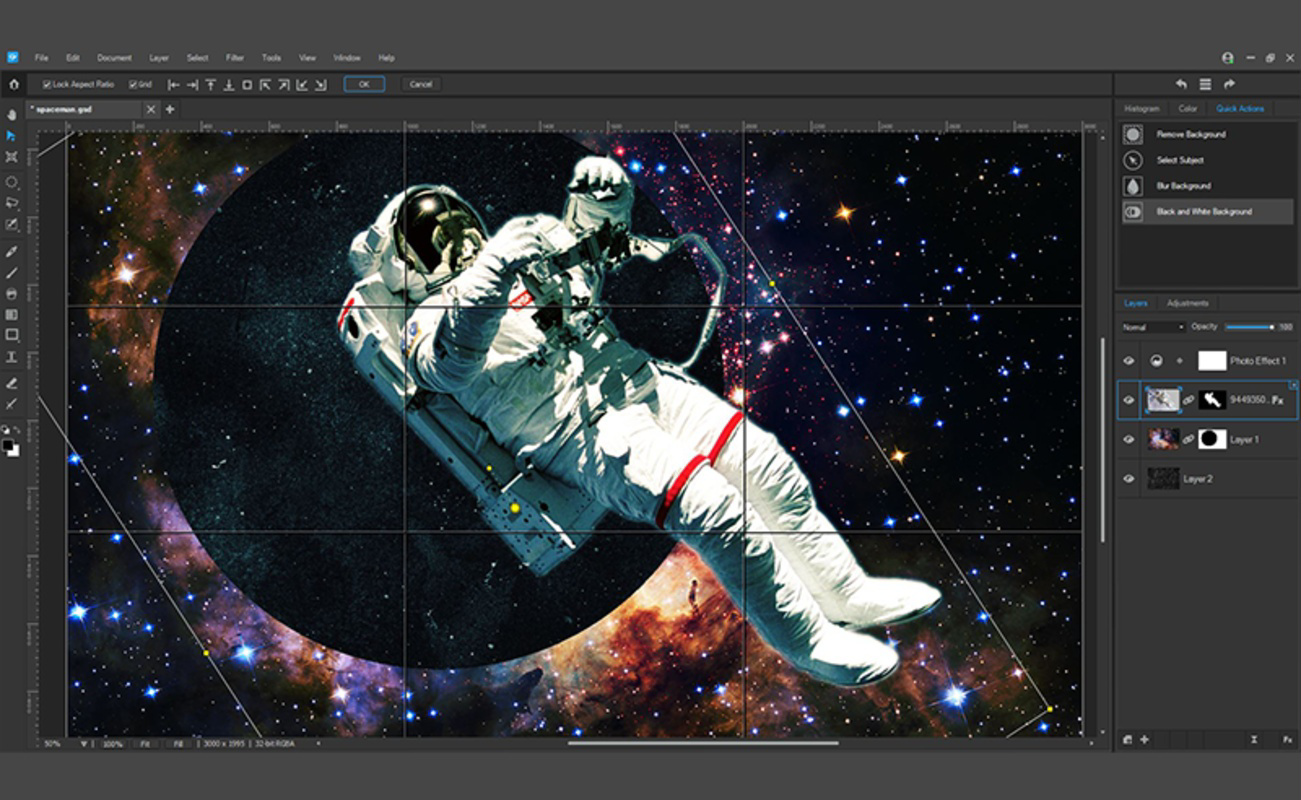
ACDSee Gemstone Photo Editor delivers a robust set of tools tailored for both casual and advanced users. The app supports limitless layered editing through a Multi-Document Interface (MDI), enabling users to work on complex compositions without performance degradation. This feature is particularly beneficial when creating composite images or applying multiple design elements, allowing for creative depth and flexibility.
- GPU-Accelerated Editing: Leverages device graphics processing for smooth, real-time edits, especially during high-intensity tasks like layer manipulation and AI-driven adjustments.
- Non-Destructive RAW Processing: Ensures original image data remains intact, allowing users to experiment freely without permanent changes.
- AI-Powered Selection Tools: Enables one-click subject and background separation, significantly reducing time spent on manual masking.
- Advanced Graphic Design Tools: Includes Layer Effects, Masks, Adjustment Layers, Lasso, Liquify, and Frequency Separation for detailed retouching and stylized edits.
- Photography Enhancement Suite: Offers HDR blending, Focus Stacking, and AI-driven lighting corrections to improve image clarity and depth.
- Color and Repair Tools: Features Color Wheels, Tone EQ, Smart Erase, and Noise Reduction for precise color grading and image cleanup.
For example, a travel photographer can use HDR and Focus Stacking to enhance landscape shots with layered depth, while a social media designer can use AI selection and layering to create dynamic promotional graphics. These tools collectively support a streamlined, professional-grade workflow directly on mobile devices.
Interface, UX & Performance
The user interface of ACDSee Gemstone Photo Editor is designed with functionality and accessibility in mind. It employs a clean, organized layout that groups tools by category, allowing users to navigate efficiently between editing modes. Visual design elements are minimal yet effective, emphasizing usability over ornamentation. The app’s navigation flow is intuitive, guiding users through editing steps with logical panel placement and consistent iconography.
While specific performance metrics were not disclosed, the app’s GPU acceleration suggests optimized responsiveness during intensive operations such as applying filters, adjusting layers, or processing RAW files. Users can expect smooth interactions across a range of device categories, including mid-tier and high-end Android smartphones and tablets. The interface remains stable during extended editing sessions, with no reported lag or crashes in available documentation.
Although the developer did not list formal performance metrics, the app’s design and technical approach indicate a focus on stability and speed. Responsiveness is maintained even when handling multiple layers or high-resolution images, which is essential for maintaining workflow continuity. The absence of visible loading delays or interface freezes supports the app’s claim of a high-performance editing environment.
Platform Compatibility & Technical Requirements
ACDSee Gemstone Photo Editor is available exclusively on the Android platform. It requires a compatible Android operating system, though specific minimum OS versions were not listed. The app has a file size of 128.4 MB, which is relatively compact for a feature-rich photo editing tool. This size suggests efficient code optimization and minimal bloat, making it accessible even on devices with limited storage capacity.
Compatibility information was not fully disclosed, so users should verify device compatibility through official channels. The app’s version is 1.0.0, indicating it is in its initial release phase. As such, future updates may introduce additional features, performance improvements, or bug fixes. The free pricing model makes it accessible to a broad audience, lowering the barrier to entry for users exploring advanced mobile editing.
Pros and Cons
Pros
- Professional-grade editing tools available on mobile
- GPU acceleration enhances performance and responsiveness
- Non-destructive editing preserves original image quality
- AI-powered tools simplify complex tasks like background removal
- Comprehensive feature set for both photography and graphic design
- Free to download and use, with no in-app purchase barriers
Cons
- Platform availability limited to Android only
- Specific OS version requirements were not disclosed
- Developer did not provide detailed technical specifications
- Limited information on update frequency and long-term support
- May require higher-end devices for optimal performance with large files
FAQ
Is ACDSee Gemstone Photo Editor free to use?
Yes, the app is currently available at no cost. There are no in-app purchases or subscription fees mentioned in the provided information.
Can I edit RAW photos with this app?
Yes, the app supports non-destructive RAW processing, allowing users to edit high-quality RAW image files directly on their mobile device.
Is the app available for iOS devices?
Based on the provided details, the app is only available for Android. There is no confirmation of an iOS version at this time.
How large is the app file size?
The app has a file size of 128.4 MB, which is considered efficient for a feature-rich photo editing tool.
Does the app require internet access to function?
While not explicitly stated, the app’s core editing features appear to function offline. However, AI tools may require connectivity for cloud-based processing.
Final Thoughts
ACDSee Gemstone Photo Editor represents a significant step forward in mobile photo editing, offering a powerful toolkit that rivals desktop software. Its combination of GPU acceleration, non-destructive editing, and AI-driven tools makes it a compelling choice for users who demand professional results on the go. Whether you're enhancing personal photos, preparing content for social media, or working on graphic designs, this app delivers the functionality needed to elevate your creative output.
While its exclusive Android availability may limit some users, those on compatible devices gain access to a rare blend of depth, speed, and precision. The free pricing model further enhances its appeal, making advanced editing accessible without financial commitment.
Download ACDSee Gemstone Photo Editor now to transform your mobile photography and design workflow.


